
Version 11.2 released on June 4, 2026
Version 10.8 released on June 23, 2026
Golive Marketplace Listing | Version History
New Features
Version Comparison Template
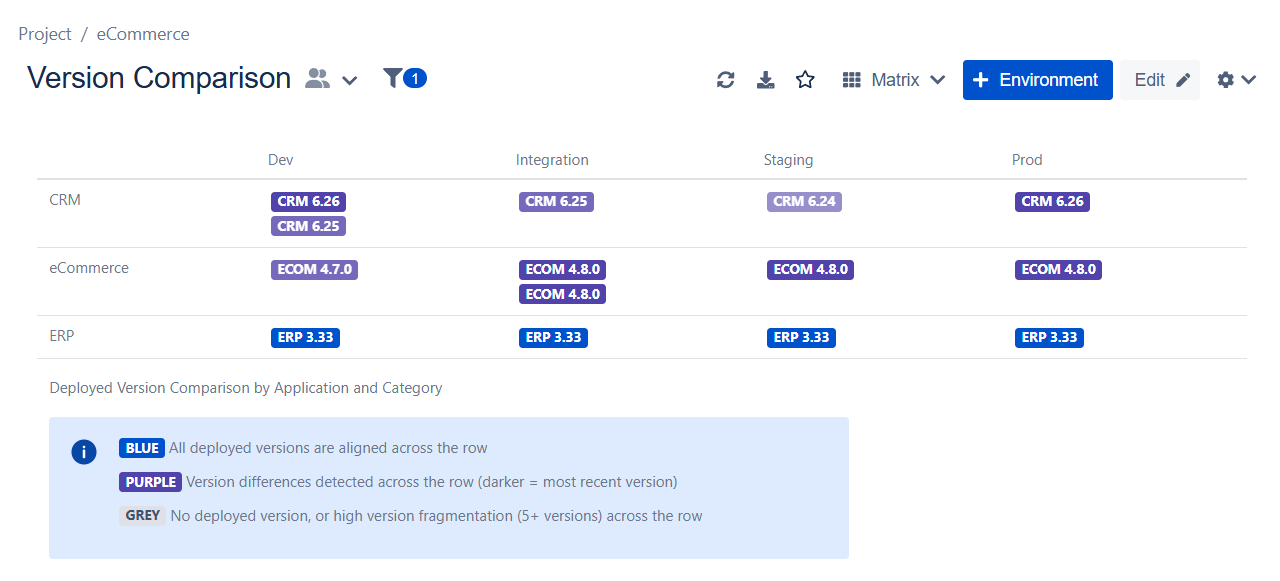
You can now compare deployed versions across your environments for the same application in a dedicated Matrix View. The template uses color-coded labels to instantly highlight version differences, making it easier to spot inconsistencies and understand deployment progress across your landscape.
The template is powered by the new Deployed Version Comparison label, which is available in any Matrix View. It works with any row and column configuration, allowing you to compare versions by environment, customer, region, application, or any other dimension relevant to your organization.
Learn more about the Version Comparison Template
Improvements
-
We’ve disabled the View Browser and event scheduling actions in Timeline Edit Mode. This UX improvement helps users save their changes before returning to the timeline for event scheduling.
-
Shared calendar pages now hide calendars when the user does not have view permission. Users without permission can no longer open the calendar dialog.
-
We've improved Matrix Views to display
<empty>when an environment exists but the field selected as the matrix label has no value. This makes it easier to distinguish environments with missing data from environments that do not exist.
Bug Fixes
-
Fixed an issue where the “New deployment” button was not working in the Last Deployment view.
-
Fixed an issue where deployment items were not always fully displayed when the related environment was not in cache.
-
Fixed a conflict between calendar reordering in Edit Mode and dragging new events in View Mode.
-
Fixed an issue where dragging new events from a standard calendar did not always respect the calendar’s environment filter.
We appreciate your feedback and thank you for your continued support.
Give feedback · Get support · Request a feature