
This integration allows you to automatically move a version to the next stage in your Release Management (RM) board, when a deployment is added to Golive. It helps keep your release tracking accurate and in sync with real deployment events, without manual updates.
Requirements
-
You must be using Golive on Jira Cloud.
-
Ensure that Release Management is installed and properly configured, with the Advanced version that supports authentication tokens.
How it Works
-
A deployment is added to Golive (either manually or automatically via CI/CD integration).
-
Golive triggers a Webhook that moves the related version to the next column in the RM board.
Configuration Steps
Step 1: Create your RM App authentication token
-
Open your RM release board.
-
Go to API Tokens.
-
Create a new token and save it. You’ll need it in Step 3.
Step 2: Get the RM Status Transition URL
-
Open your RM board and select any version.
-
Click the link icon next to the status selector.
-
Choose the target status for the automation and copy the generated link. This link includes the board ID and destination column ID.
Step 3: Create a Golive Automation
In Golive, create a new Automation Rule using a Webhook. For more information, refer to the Golive Webhook documentation article.
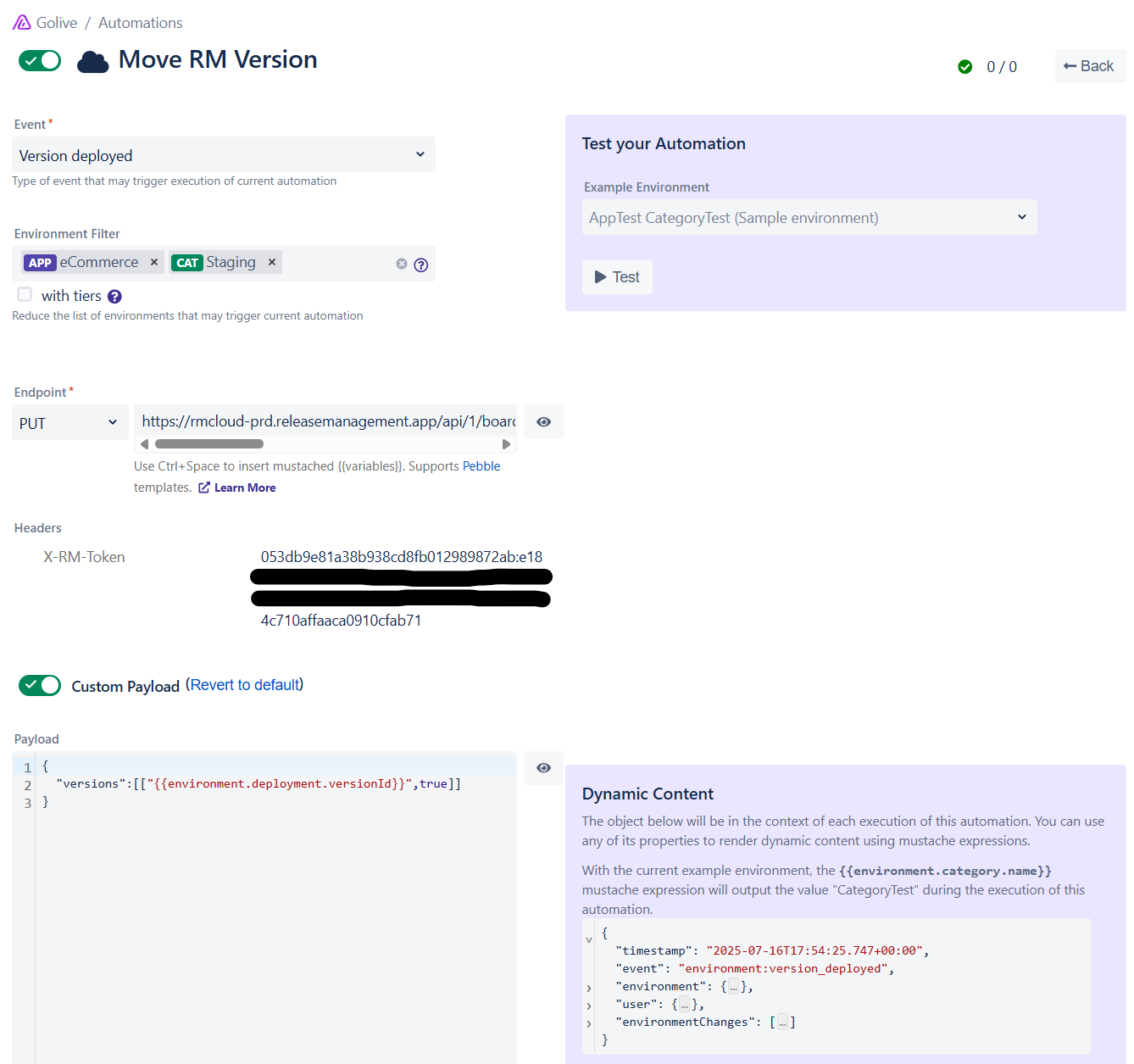
Webhook Configuration
Endpoint: PUT
https://rmcloud-prd.releasemanagement.app/api/1/board/<YOUR_BOARD_ID>/version/{{environment.deployment.versionId}}/move?columnId=<YOUR_DESTINATION_COLUMN_ID>
Info
Use the link copied in Step 2, replacing the version ID with the smart value {{environment.deployment.versionId}}.
Example: https://rmcloud-prd.releasemanagement.app/api/1/board/5e4ae23dfc003fehghce2/version/{{environment.deployment.versionId}}/move?columnId=5edfee7afdfdf003fgf6cdc
Headers
Add an X-RM-Token header with the value of token that was generated on the Step 1:
X-RM-Token: <your_token_from_step_1>
Custom Payload
{
  "versions":[["{{environment.deployment.versionId}}",true]]
}
Questions?
If you need help with your Golive-Release Management integration, feel free to contact us.